7. Expressive recording
Record MPE, polyphonic aftertouch and MK3 pad pressure as curves on each note, edit them, and play them back.
Maschine records a note’s pitch, velocity and length. DECKARD can also record how you played it after it started, as curves on the note itself, in the way Ableton Live’s Note Expression does. Each note can carry up to four:
| Curve | What it records |
|---|---|
| Pressure | How hard you press while the note is held. |
| Slide | A finger’s up-and-down movement on an MPE key (MIDI CC 74). |
| Pitch | A bend of that one note. |
| Release | How fast the key was let go. |
Recording works as in Maschine: arm with REC and press PLAY (SHIFT + REC adds a count-in). Pads, MIDI keyboards and the computer keyboard (⌘K) all record into the playing pattern, and each take is one undo step.
Where expression comes from
MPE controllers
For a Roli, Linnstrument, a Hydrasynth in MPE mode or another MPE controller:
- Open Preferences ▸ MIDI and tick MPE beside the controller’s input.
- Set its pitch-bend range there. The default is ±48 semitones.
Each note’s bend, slide and pressure are then recorded with it.
Polyphonic aftertouch
A keyboard or a Launchpad that sends pressure per key records it as each note’s Pressure. There’s nothing to set up.
Channel aftertouch, pitch bend and controllers
These aren’t per note, so they go into the pattern’s controller lanes (“Aftertouch”, “Pitch Bend” or a CC number). They overwrite the lane while you move the control, and stop when you let go.
Pad pressure on the MK3
Each sound has a Pad Touch setting. Set it in the pattern header (PAD TOUCH), or on the MK3’s Keyboard page under its last two knob pages.
| Mode | What pad pressure does |
|---|---|
| Velocity (the default) | Only shapes Note Repeat, as in Maschine. |
| Poly AT | Recorded as each note’s Pressure curve. |
| Aftertouch | Sent and recorded as channel pressure. |
| CC | Sent and recorded as a controller number you choose. |
Curve, Min and Max shape how pressure turns into the value sent. In the pressure modes, pads play at a fixed velocity.
Seeing and editing expression
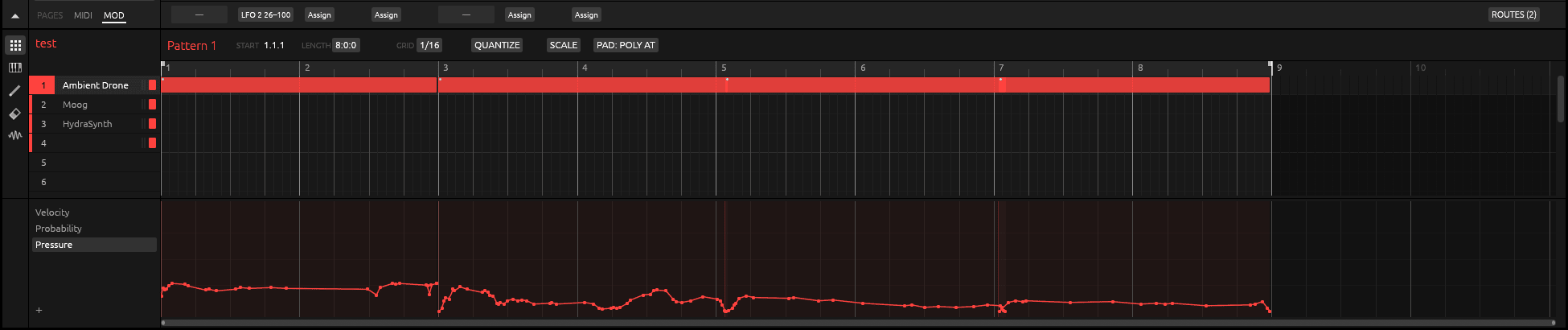
Once a sound’s notes have expression, the lane list under the pattern offers Pitch, Slide, Pressure and Release. A small dot marks a note with expression. In a lane:
- click to add a point, and drag a point or a segment to move it;
- ⌥-drag a segment to bend it into a curve;
- double-click a point to remove it;
- in draw mode (E), draw freehand;
- right-click to clear one kind of expression, or all of it, from the selected notes.
The Pitch lane’s range is ±2, 12, 24 or 48 semitones, and the piano roll draws each note’s pitch curve over the note.
Playing it back
- To a MIDI synth:
- a normal MIDI output gets each note’s pressure as polyphonic aftertouch, and its release velocity;
- an output marked MPE in Preferences ▸ MIDI gives every note its own channel with its bend, slide and pressure. DECKARD sends the synth its MPE setup for you (Send MPE setup to synths, on by default).
- To DECKARD’s own sounds: use Pressure, Slide and Pitch as sources in the mod matrix.
Note: Expression isn’t passed to hosted plug-ins yet.