10. Controlling modular synths
Send LFOs and envelopes to a modular synth as control voltage, play a voice with Zhora and keep it in tune, and tune anything else with the Tuner.
With an audio interface that can send DC, DECKARD can drive a modular synth directly. Its LFOs and envelopes go out as control voltage (CV), and Zhora, an instrument built for this, plays a modular voice from your patterns. Zhora listens to the voice come back and keeps it in tune. Maschine has nothing like this.
You need:
- A DC-coupled interface. Most interfaces block slow signals, so an LFO or a held pitch never gets out. A DC-coupled one, such as many of MOTU’s, passes them. Check your interface’s specifications for “DC-coupled”.
- Cables from those outputs to the modular’s CV inputs. For Zhora, also a cable from the voice back to an input.
Setting up the outputs
First tell DECKARD which channels go to the modular. Open Preferences ▸ Audio, and under Routing choose Output. Tick CV only beside each channel wired to the modular.
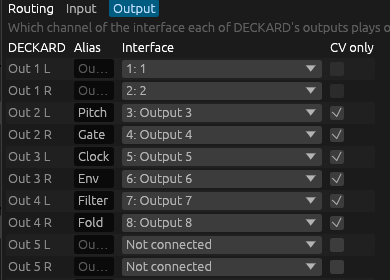
- A CV only channel never gets audio. It isn’t offered as an output for a sound, group or mixer strip. If a strip already plays there, the mixer flags it and it stays silent.
- The master and the cue can’t be moved onto CV. A channel they play on can’t be ticked.
- Name the channels. Type a name in Alias, such as “Pitch” or “Filter”, and it replaces “Out 2 L” everywhere the channel is offered.
- The ticks belong to this computer, not the project. Open the project on another computer and its CV routes stay silent until you mark channels there too.
Sending LFOs and envelopes as CV
Any LFO or envelope from the LFO panel (see LFOs and envelopes) can move a CV output.
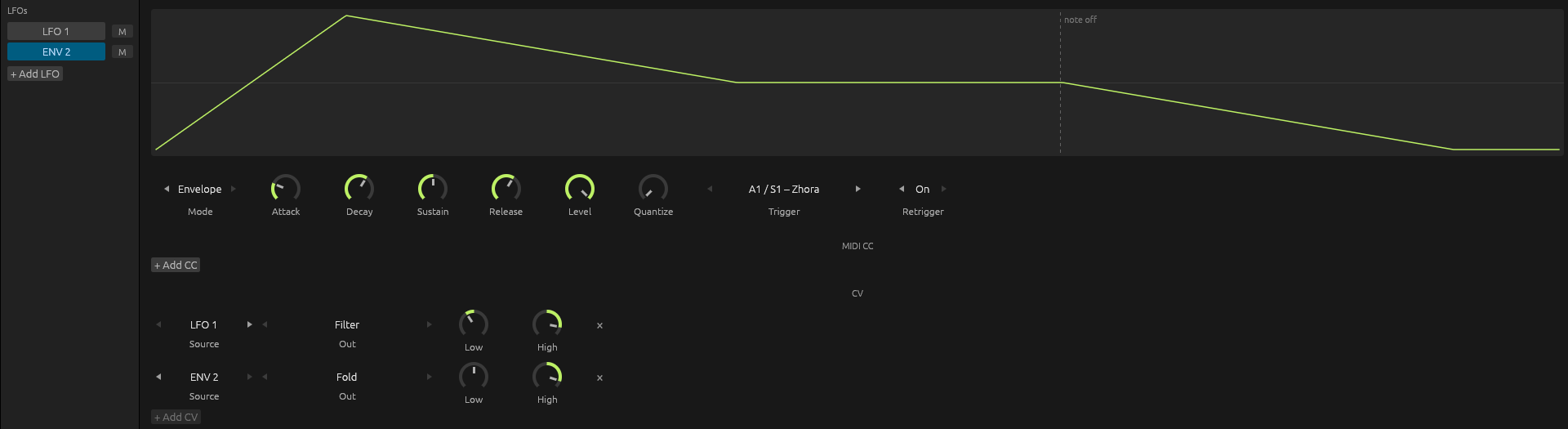
- Open the LFO panel with the circle-and-sine button in the header.
- In its CV section, click + Add CV. The new route takes the first LFO and the first free CV only channel. + Add CV is greyed out when there are no LFOs or no free CV only channels.
- Set its Source, its Out and its range.
| Part | What it is |
|---|---|
| Source | LFO 1–16 or ENV 1–16. |
| Out | A CV only channel. Channels another route or Zhora already has aren’t offered. |
| Low and High | The voltage at the bottom and the top of the source’s movement, from −100% to +100% of the interface’s full scale. A new route starts at Low 0%, High 50%. Set Low above High to turn it upside down. |
| × | Removes the route. |
How many volts 100% is depends on your interface. Start low and raise High while you listen.
A route that sends nothing says so under it, for example when its channel isn’t CV only on this computer.
On the MK3
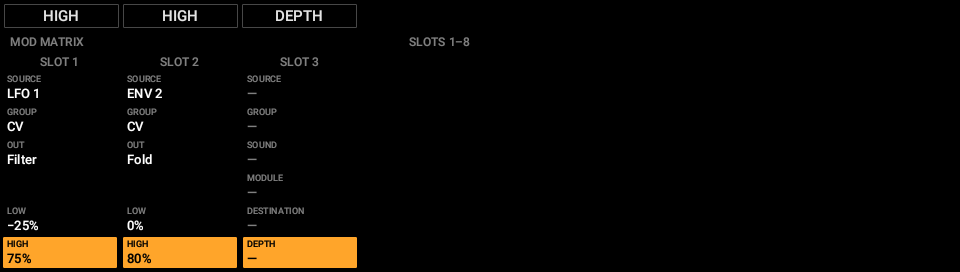
On the mod matrix page (SHIFT + SOLO), turn a route’s Group past the last group and past MIDI to CV. The rows then read Source, Group, Out, Low and High. The route is made once you choose an Out.
What CV skips
CV goes straight to the interface. It skips the master, faders and effects, and it isn’t in exports or stems. A muted LFO’s output rests at the route’s Low. A CV only channel with no route on it sits at 0 V.
Zhora
Zhora is an instrument that plays one voice of a modular synth. It sends pitch, gate and other signals to CV only outputs, listens to the voice come back on an input, and tunes its pitch output so the voice plays in tune. Add it from the + at the end of a sound’s chain: Internal ▸ Zhora.

Playing
Zhora plays one note at a time. The newest note wins, and letting go of it goes back to a note still held. It follows pitch bend, and Glide slides from one note to the next. Notes come from the sound’s patterns, the pads and the keyboard, as for any instrument.
Its outputs
Each signal goes to a CV only channel, or to None. Only channels that are CV only and free are offered. If a channel stops being usable, for example because it’s no longer CV only, Zhora says which signal isn’t sent and why.
| Signal | What it sends |
|---|---|
| Pitch | The note, tuned by the table Tune builds (see below). |
| Gate | High while a note is held. |
| Clock | Pulses at Division of the tempo (1/32 to 1/2, with triplets), while DECKARD plays. |
| Env | Zhora’s own ADSR envelope, played by each note. |
| Velocity | Each note’s velocity, held until the next note. |
| Mod Wheel | The mod wheel. |
Gate, clock, envelope, velocity and mod wheel each have a Level, 50% to start. Set it by ear or with a scope to suit the module it drives.
The return input
Input chooses where the modular’s sound comes back:
- One channel of your interface, by the name you gave it in Preferences ▸ Audio ▸ Routing ▸ Input. A mono return plays on both sides.
- Sound’s Input, the input chosen for the sound itself, mono or stereo.
- None.
The sound coming back plays through Zhora’s sound like any audio input: with the sound’s input gain, its effects, fader, mute and solo, and it can be recorded.
Pages
| Page | Knobs 1–4 |
|---|---|
| OUTS | Where Pitch, Gate, Clock and Env go. |
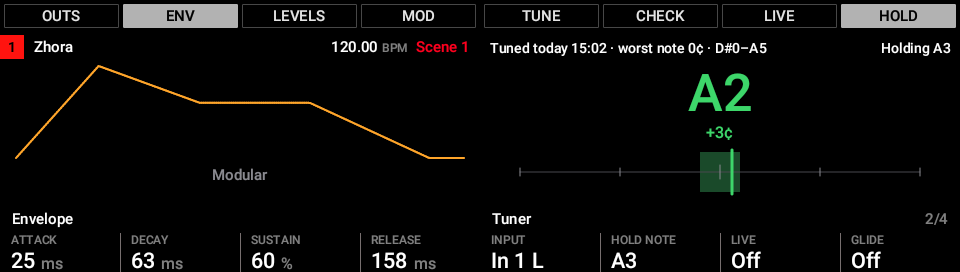
| ENV | Attack, Decay, Sustain and Release of Zhora’s envelope. |
| LEVELS | Clock Division, and the Clock, Gate and Env levels. |
| MOD | Where Velocity and Mod Wheel go, and their levels. |
Knobs 5–8 are the same on every page: Input, Hold Note, Live and Glide.
Tuning Zhora
A modular’s oscillator is never exactly 1 volt per octave, and it drifts as it warms up. Zhora measures the oscillator and makes a table that puts every note in tune.
Tune
- Patch the voice back to the input Zhora listens on. Turn off any effects on the voice, and open its filter, so a clear pitch comes back.
- Press TUNE.
- Zhora steps the pitch output through the range for a few seconds, listening to each step. It then builds a table that puts every note in the range it found within 5 cents.
The line under the tuner shows the result, such as “Tuned today 14:59 · worst note 3¢ · C1–C7”: when it was tuned, the worst note’s error, and the range. A note outside that range plays the nearest note inside it, and the screen says Out of range.
- The table is saved with the project. Tuning is its own undo step.
- If Zhora can’t hear a clear pitch, it says so and keeps the table it had.
- Pressing TUNE again stops a tune.
- Latency: Tune allows for up to half a second of delay through your interface. A buffer of 256 samples is a good setting while tuning.
Check
CHECK plays a spread of notes again and shows the worst one, without changing the table. Use it after touching the oscillator’s tune knob or your interface’s output level, to see whether you need to tune again.
Live
With LIVE on, Zhora corrects slow drift while you play. It only corrects held notes, and only slowly, so vibrato survives.
Hold and the tuner
HOLD holds pitch and gate on Hold Note (A3 to start), so both hands are free to turn the oscillator. Meanwhile the tuner shows the note it hears, how many cents off it is, and a needle, all green within 5 cents. The tuner reads the input all the time, with A at 440 Hz, so you can also use it to set the oscillator’s coarse tune before running TUNE.
Zhora on the MK3
With Zhora selected in the Control area, the MK3 shows its pages and tuner.
- Display buttons 1–4 choose the OUTS, ENV, LEVELS and MOD pages.
- Display buttons 5–8 are TUNE, CHECK, LIVE and HOLD.
- The right screen is the tuner, with the result of the last tune above it.
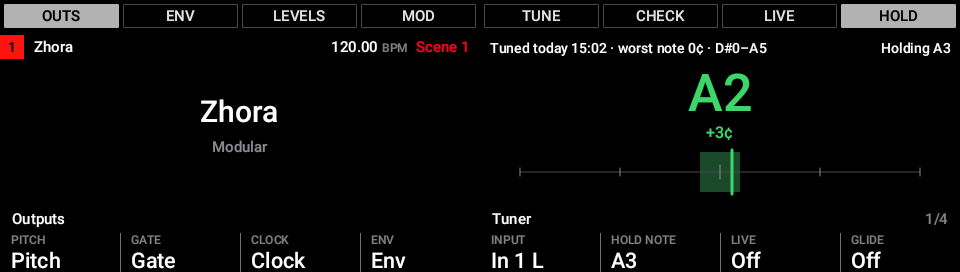
On the ENV page the left screen draws the envelope. It changes shape as you turn Attack, Decay, Sustain and Release.
Exporting and recording
An export can’t play your modular, so Zhora’s part is left out of mixdowns and stems, and the Export panel says so. To include it, record its return as audio first, as you would any input.
The Tuner effect
The Tuner is an effect for tuning anything that comes in: a guitar, a bass, a voice, or a modular voice without Zhora. Put it on a sound’s, a group’s or the master’s chain from + ▸ Internal ▸ Tuner. The sound passes through it unchanged.

| Knob | What it does |
|---|---|
| Reference | The pitch of A4, from 430 to 450 Hz. 440 Hz to start. |
| Mute | Silences the sound after the Tuner, so you can tune quietly. The Tuner still listens. |
When the Tuner is selected, the MK3’s right screen shows the note, its cents and the needle, green within 5 cents, as for Zhora.
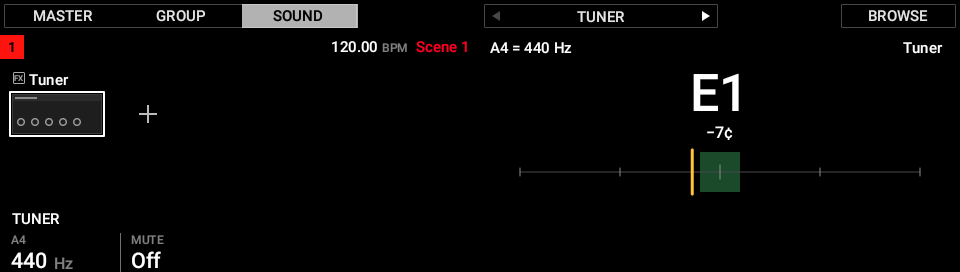
Note: DECKARD names notes as Maschine does, with middle C (MIDI note 60) as C3. So a guitar’s low E reads E1, and 440 Hz is A3.
Saving
Zhora and the Tuner are saved in the project like plug-ins. Maschine can’t play them and reports them as missing plug-ins, but keeps their settings, including Zhora’s tuning table, when it saves the project.