5. The Launchpad Pro MK3
Use Novation's Launchpad Pro MK3 as a session grid for scenes and patterns, alongside or instead of the MK3.
Maschine has no Launchpad support. In DECKARD, a Launchpad Pro MK3 shows the Ideas view as a grid of pads: launch scenes, put patterns in and out of them, and mute groups, while the MK3 plays and edits. Its own Note, Chord and Sequencer modes play the focused sound.
Plug it in over USB. There’s nothing to set up: DECKARD switches it to DAW mode, and back to standalone when DECKARD quits.
The buttons DECKARD uses
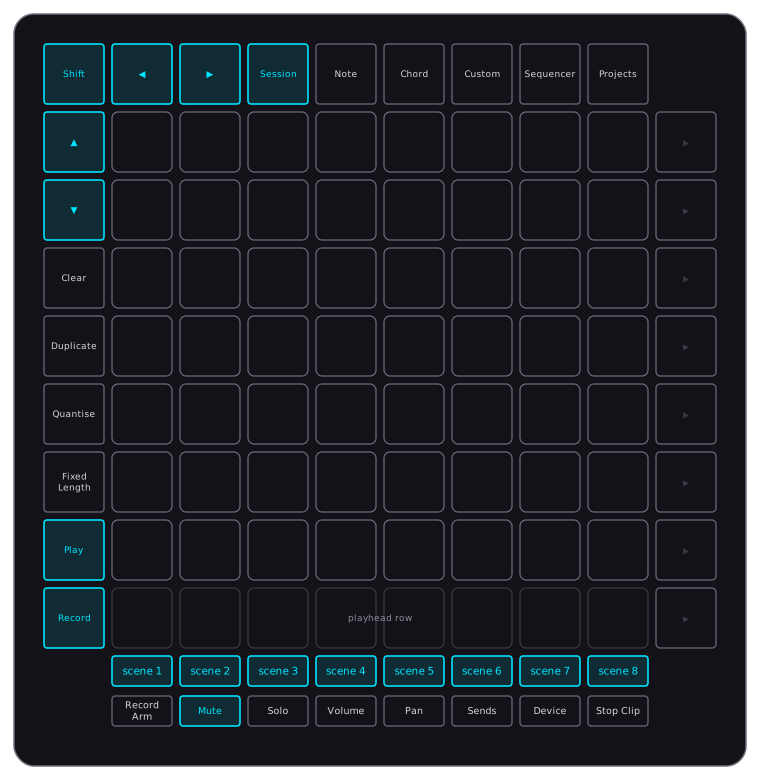
| Button | In DECKARD |
|---|---|
| Session | Shows DECKARD’s session grid. |
| ◀ ▶ | Scroll the scenes eight at a time. DECKARD’s scene tabs scroll to match. |
| ▲ ▼ | Scroll the patterns seven at a time. |
| Shift + ◀ ▶ | Show the previous or next eight groups. |
| Play | Start and stop playback. Green while playing. |
| Record | Start and stop recording, as REC on the MK3. Red while recording. |
| Mute | Switch Mute mode on or off. Yellow while on. |
| The row under the grid | The scenes. |
| Note Chord Sequencer | The Launchpad’s own modes, which play the focused sound. |
The arrows light when there’s somewhere to scroll to.
Session mode
The grid
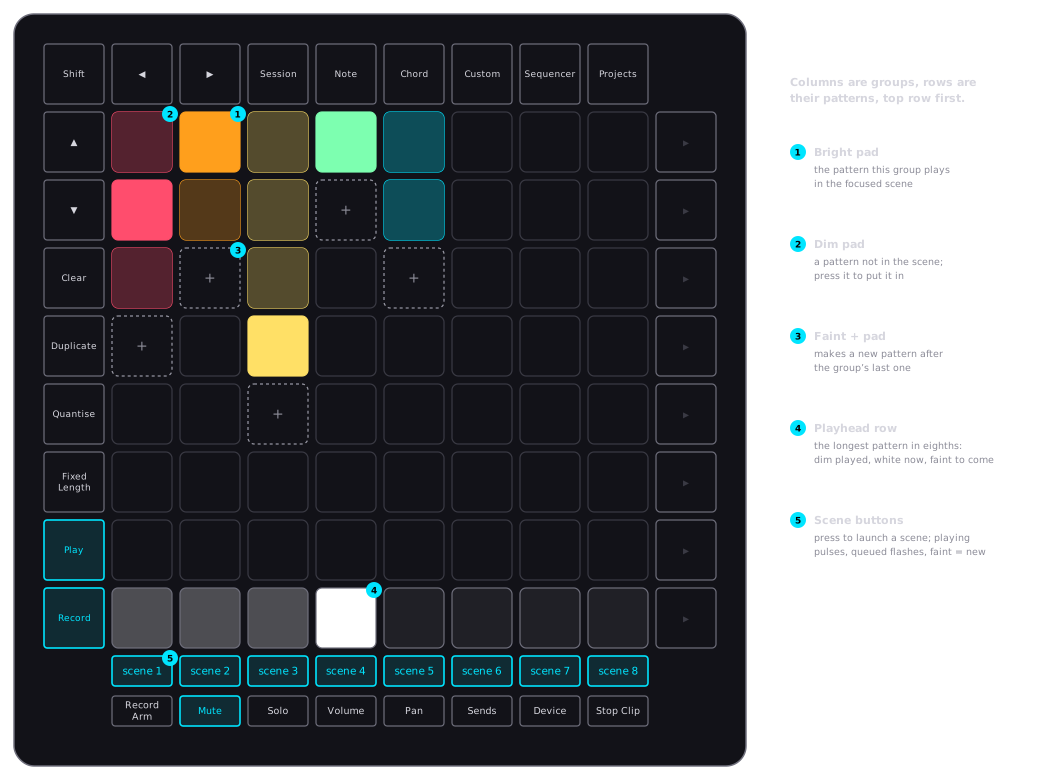
- Each column is a group, the eight around the focused one, with its patterns down the top seven rows in the colours you gave them.
- A bright pad is a pattern the focused scene plays. A dim pad is a pattern it doesn’t.
- Press a pad to put its pattern in the focused scene, or take it out. A group plays one pattern per scene, so the one it played goes out. The focus on the MK3 doesn’t move, so you can change one part here while you play another there.
- The faint pad after a group’s last pattern makes a new pattern, already in the scene.
- The bottom row is a playhead. While playing, it spreads the scene’s longest pattern over the eight pads: played pads are dim, the pad playing now is white, and the ones to come are faint. Stopped, its first pad blinks with the tempo.
Scenes
- The buttons under the grid are the scenes. Press one to launch it. When playback is stopped, it also starts playing.
- The focused scene is lit fully, the playing one pulses, and a queued one flashes until it starts. While a scene is queued, its patterns flash and the ones still playing stay lit, so you see what’s ending and what’s next.
- The faint button after the last scene makes a new scene.
Mute mode
Press Mute, then:
- a pad mutes or unmutes its column’s group;
- a scene button mutes the groups that play in that scene, or unmutes them if they’re all muted already.
A muted group’s pattern shows dimmer. Press Mute again to leave.
Note, Chord and Sequencer modes
These are the Launchpad’s own modes. Their notes play the focused sound, as any MIDI keyboard does. The Launchpad’s pressure is recorded as polyphonic aftertouch: see Expressive recording.
To keep the Launchpad’s sequencer in time with DECKARD, send it MIDI clock: in Preferences ▸ MIDI ▸ Sync, choose Send Clock and switch on the LPProMK3 MIDI output.
Playing drums from the Launchpad
The Launchpad’s drum tracks and Drum layout can play the focused group’s 16 pads, as the MK3 does in Pad mode:
- On the Launchpad, give the drum track a channel of its own: Shift + Sequencer, then the track’s channel. Channels 1–4 are already used by the sequencer’s tracks, so pick another, such as 10.
- In DECKARD, open Preferences ▸ MIDI and set Drum channel for Launchpad Pro [MK3] to the same channel.
Notes from C1 (36) to D#2 (51) on that channel then play pads 1–16 of whichever group is focused, each sound at its root note.
Print to Clip
In Sequencer mode, the Launchpad’s Print to Clip writes its sequence into the focused group’s pattern in the focused scene, in one undoable step.
- A pattern is made if there isn’t one, and it takes the sequence’s length.
- Notes that run past the end wrap round to the start.
- For a drum track, set Prints (beside Drum channel in Preferences ▸ MIDI) to the drum track’s number, 1–4. Its notes then land on pads 1–16, replacing the group’s notes in the pattern.
- Otherwise the notes go to the focused sound at the pitches the Launchpad sent, replacing that sound’s notes.
If part of the sequence goes missing on the way, nothing is printed and the status bar says so.
Note: The Launchpad Pro MK3 has been tested on macOS. On Windows its port names haven’t been checked yet.