8. Multi-output plug-ins
Give each extra output of Kontakt, a drum sampler or any multi-output plug-in its own mixer strip, output and stem.
Plug-ins such as Kontakt, Battery-style drum samplers and modular hosts can send different parts to different outputs: the kick on one pair, the snare on another, a pad on a third. In Maschine you reach those outputs by routing them into other sounds’ audio inputs. In DECKARD each one simply gets its own strip in the mixer, with its own fader, pan, mute, solo, meter and output.
How strips appear
You don’t add extra-output strips yourself.
- Load a plug-in with more than one output into a sound’s, a group’s or the master’s chain.
- In the plug-in, send something to one of its other outputs. In Kontakt, for example, set an instrument’s output to st. 2.
- Play. A strip appears the first time sound comes out of that output.
Outputs that never play get no strip, so a 16-output Kontakt doesn’t fill the mixer with silent strips. Once a strip has appeared it stays, and it’s saved with the project. Appearing doesn’t add an undo step.
A plug-in’s strips go when you remove or replace the plug-in.
This works for VST3 plug-ins and, on macOS, Audio Units. An Audio Unit instrument that lets the host choose its outputs is given up to 16 stereo pairs. Kontakt 8, for example, offers 16.
Reading a strip
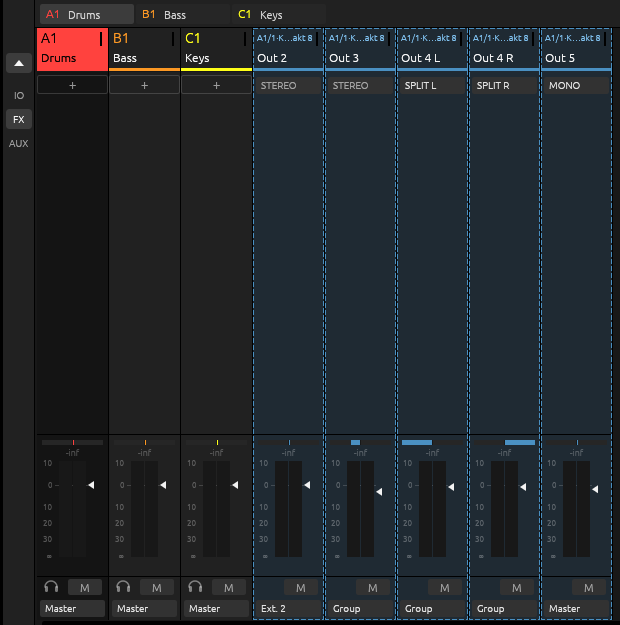
Extra-output strips are tinted blue and sit in the groups mixer, after the groups and just left of the Master. To get there, double-click a group tab at the top of the mixer. (Click a tab for that group’s sounds; double-click a group’s strip to go back to its sounds.)
| Part | Shows |
|---|---|
| Header | Whose plug-in it is, by mixer ID, and the plug-in’s name. A1/1·Kontakt 8 is Kontakt 8 on sound 1 of group A1. A group’s plug-in shows as A1, the master’s as M. |
| Name | The output: Out 2, Out 3, and so on. When the plug-in gives the output a real name, such as “Snare”, it’s added. |
| Mode | STEREO, MONO, or SPLIT L / SPLIT R. |
| Fader, pan, meter | The strip’s own. The fader of the sound that owns the plug-in doesn’t move it. |
| M and solo | Mute and solo this output alone. |
| Output | Where the strip plays: see below. |
Stereo, mono or split
Click the mode under a strip’s name to change it.
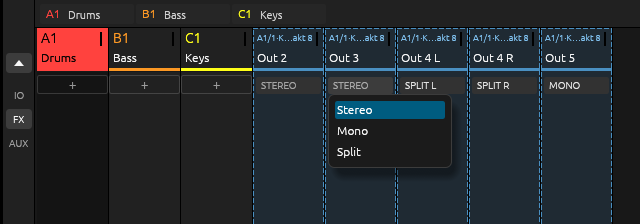
- Stereo plays the pair as it is.
- Mono sums left and right into one signal.
- Split turns the strip into two strips, L and R, each with its own fader, pan, mute and output. Use it when a plug-in puts two mono parts on one pair. Pan a split half hard left or right to play it on one side of its output.
- Join, in the menu of either half, puts a split strip back together, with the left half’s settings.
Where a strip plays
Click the button at the bottom of a strip to choose its output.
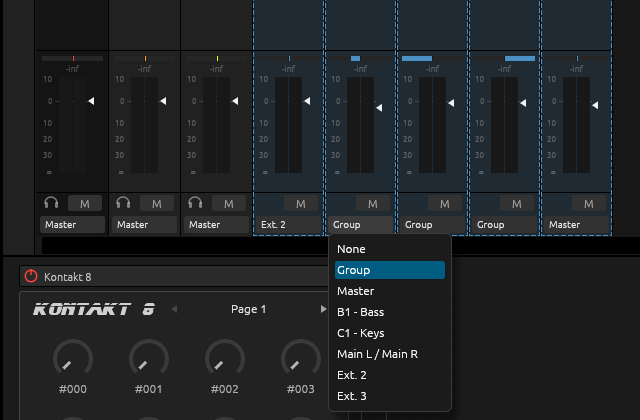
- A new strip takes the next free hardware output of your audio interface. When there’s none, it plays through its parent: the group for a sound’s plug-in, the master for a group’s.
- Group, Master, another group or sound, the main outputs, or any other hardware output (Ext. 2, Ext. 3…) can be chosen. Anything that would feed the strip back into itself is left out.
- None silences it.
Exporting
File ▸ Export Audio… writes a strip that has its own hardware output as its own stem, beside the group and sound stems. So with Kontakt’s drums on separate outputs, each drum comes out as its own file.
Limits
- A strip routed into a sound goes through that sound’s fader, but not its effects.
- DECKARD has no aux sends yet, so a strip can’t feed a send effect.
- Soloing a strip that belongs to a master plug-in keeps the master’s main output audible.